Rootful / Rootless / RootHide (deeply tuned for RootHide)
Install
Add the repo https://apt.razerapp.cn in Sileo or Cydia, refresh, search for RAZER and install the build that matches your jailbreak. See the installation guide.
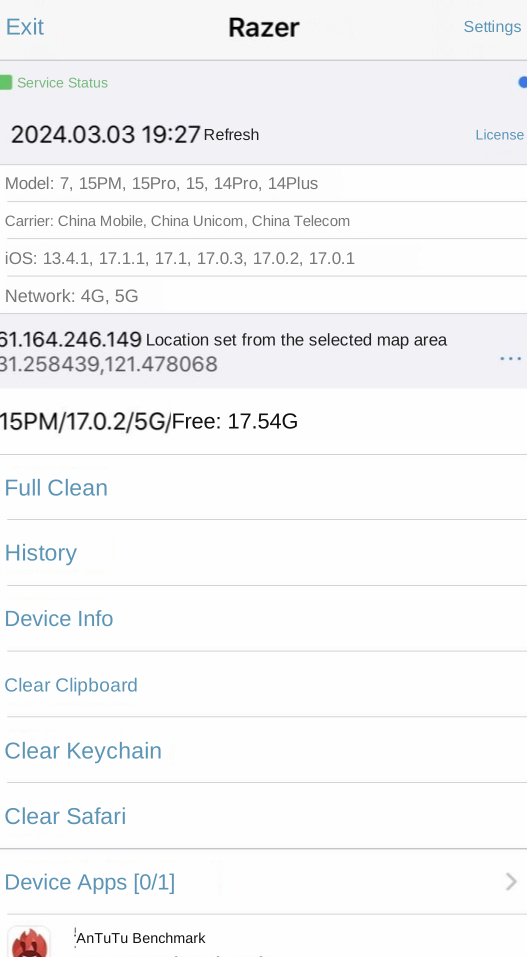
iPhone 4S through iPhone 15 Pro Max, including regional variants: US, Taiwan, Hong Kong, mainland China and Japan
iOS version
iOS 8.0 to iOS 17.1
Carrier
China Mobile, China Unicom, China Telecom and overseas carriers — 87 in total
Network type
2G, 3G, 4G, 5G, Wi-Fi
Privacy
Feature
Details
Jailbreak detection bypass
Evades jailbreak checks in most apps
Smart airplane mode
Toggles airplane mode automatically when needed, switching networks and preventing data leaks
Virtual location
Locate from your IP, or pick a city yourself
Built-in simulation
Simulates battery drain, hides charging state, and syncs boot time and app install dates so the environment looks genuine
Backups
Feature
Details
Full backup
Captures all app data and state, restoring to exactly the state you backed up
Import and export
Backup records can be exported and imported, which makes moving between devices easy
File manager
Browse and manage device files from a desktop browser over your local network
Cleanup
Feature
Details
Full cleanup
Wipes all data and cache for the selected app, returning it to a first-launch state
Deep cleanup
Additionally clears jailbreak state, VPN profiles, network settings and carrier data for a complete environment reset
Tips
Do not jump too far between models and iOS versions. The bigger the gap, the more likely apps crash. Pick a model released around the same time as yours, with the same screen size.
Full cleanup in RAZER is the one-tap reset.
On first use, run a full cleanup with default settings and confirm the target app opens normally.
Once that works, enable the extra options one at a time, testing after each.
Only use deep cleanup when you genuinely need to reset the environment.
Take a full backup before cleaning up anything important.